F.A.Q
About Vyntex CBC Centre
Welcome to Vyntex CBC Centre — your trusted partner in Competency-Based Curriculum (CBC) learning.We are dedicated to supporting learners, teachers, and parents across Kenya with high-quality academic resources designed to make learning effective, engaging, and accessible for all.
At Vyntex CBC Centre, we provide a wide range of CBC-aligned materials from Preschool to Senior Secondary School, including notes, revision exercises, schemes of work, and digital learning guides. Our goal is to simplify the CBC journey by offering well-structured and curriculum-based content that promotes creativity, critical thinking, and lifelong learning.
To make learning even more interactive, we offer online exams and assessments for learners in Grade 3 to Grade 9. These tests are automatically marked on the spot, allowing learners to instantly view their performance and track their progress. This instant feedback helps identify strengths and areas that need improvement, empowering learners to grow confidently.
Whether you are a student aiming to improve, a teacher seeking quality CBC materials, or a parent looking to support your child’s education — Vyntex CBC Centre is here to make learning simple, smart, and successful.
At Vyntex CBC Centre, we provide a wide range of CBC-aligned materials from Preschool to Senior Secondary School, including notes, revision exercises, schemes of work, and digital learning guides. Our goal is to simplify the CBC journey by offering well-structured and curriculum-based content that promotes creativity, critical thinking, and lifelong learning.
To make learning even more interactive, we offer online exams and assessments for learners in Grade 3 to Grade 9. These tests are automatically marked on the spot, allowing learners to instantly view their performance and track their progress. This instant feedback helps identify strengths and areas that need improvement, empowering learners to grow confidently.
Whether you are a student aiming to improve, a teacher seeking quality CBC materials, or a parent looking to support your child’s education — Vyntex CBC Centre is here to make learning simple, smart, and successful.
What services are offered by Vyntex CBC Centre?
- CBC Notes guide.
- Cbc Schemes of work.
- Cbc Lesson plans.
- Cbc Assessments papers.
- Cbc Holiday Assignments.
- Cbc Curriculum design.
- Cbc Assessment Rubrics.
- Cbc Topical Questions
Are resources on Vyntex CBC centre website free?
Our resources are mostly purchased while we also we provide some for free.
Which numbers can clients call when stranded?
Call or Whatsapp
0710250520How can I access this website?
Open our website www.vyntexcbccentre.com on your phone
Click the three line on top left of your screen as shown below
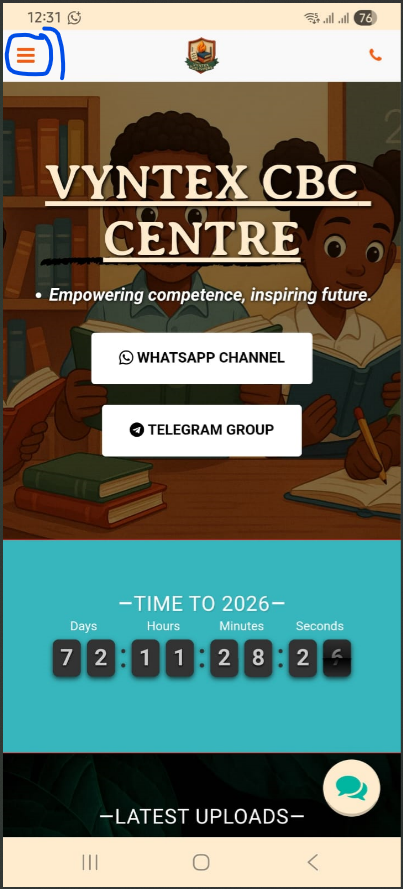
Click the three line on top left of your screen as shown below
How does A learner do Exams and assignments here?
- Select your class.
- Click your class resources.
- Use left or right arrow to navigate through the menu until you see "Do Exams & Holiday Assignments Here"
- Click Register or sign in and create your account.
- When signed in Click Do Exams here and select your class.
- Check and select the full set of Exams or assignment you want to do.
- Click pay and enter the Mpesa number to pay with.
- Enter pin and the exams pay will indicate Access Exams.
- Click on the paper you want to do and Submit.
- When you finish all papers in a set Go to Results and download results Slip